If you run a business on older systems, you’ve probably noticed an uncomfortable shift. The more your team works remotely, the
less sure you feel about what your systems are actually exposed to. Software that once felt solid and predictable in one office now looks fragile when people connect from home networks, shared Wi‑Fi and random hotel rooms. The core system hasn’t changed, but the way people reach it certainly has.

Artificial intelligence sits right in the middle of that problem. Not as a buzzword, but as a practical way to watch old systems more closely, spot trouble earlier, and make better decisions about what to fix first. AI is very good at spotting patterns in messy data, and legacy systems that are subject to remote access create a lot of messy data. In this ZandaX article, we show how when you bring the two together, you finally start to see what’s really going on instead of simply guessing.
The Challenges For Legacy Systems With Remote Workers
IT systems were originally built for a world where most people came into the office, sat behind the company firewall and used company‑managed devices. The “edge” of your network was basically the office door. Once you were inside, the system trusted you. But that world has gone! Staff now log in from apartments, trains, hotels and coworking spaces on devices that may not be under your control. The system is still in the data center, but the boundary around it
has dissolved. Scary, eh?
That creates a mix of security and visibility problems. Older software often relies on simple usernames and passwords, while modern security expects multi‑factor checks and “never trust by default” policies. When you bolt those newer ideas onto older platforms, things creak. People get locked out, so shortcuts appear. Administrators quietly loosen controls just to keep the business running. And every one of those small compromises increases risk and nobody has designed the environment as a whole.
A typical scenario looks like this. A finance platform created in the mid‑2000s still runs billing and reporting. During the pandemic, the finance team went fully remote and never came back. To make that work, IT opened up remote access, added a VPN and layered on some extra checks. On paper, yes, it’s secured. But in reality, dozens of employees now connect from weakly secured home routers, and contractors keep their access long after projects end. The system has become the center of a messy, ad‑hoc web of connections, and – frankly – you are relying on good luck as much as good design.

If you'd like to learn more about what we provide, why not take a look at how we can help?
Boost your skills with our market-leading online courses at super-low prices.
The awkward truth is that if you want AI legacy system security, you usually can’t just replace these systems. They’re tied into production, compliance or revenue in ways that are near impossible to untangle. Rewriting or migrating them is expensive, risky and slower than anyone wants to admit – or even think about. Managers know that security is way short of where it should be, but they don’t have a realistic path to tear everything out. Companies looking to improve their legacy system security can choose, for example, to
contact Virtual IT to look at options for customized AI integration and remote monitoring services. That’s because the gap between what you have and what you wish you had is exactly where AI, used properly, can help.
How AI Changes the Game in Reducing Risk
The useful thing about AI here is not that it is “smart”, but that it is persistent. It will sit and watch logs, connection patterns, error messages and access attempts all day without getting bored or missing something because it is a Friday afternoon. Over time, it learns what normal looks like for your business and your existing systems, and becomes good at spotting the things that do not fit that pattern.
Instead of relying on static rules like “alert after five failed logins”, AI looks at the whole picture: who is logging in, from where, at what times, on which device and what they do once they are in. When an account suddenly behaves in a way that does not match its history, the system can flag it or demand extra checks. That applies whether the activity comes from a compromised laptop at home or a malicious insider probing an old application.
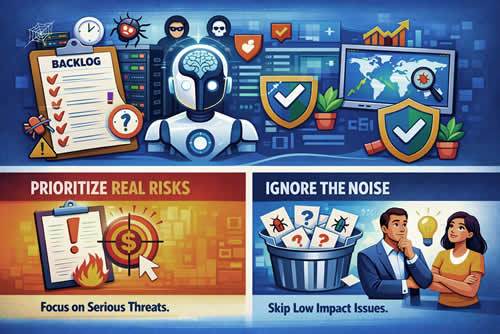
AI can also help you deal with the constant stream of vulnerabilities and patches that come with established platforms. Most organizations sit on a backlog of “we should fix this when we get time” items. Not all of them are equally dangerous. An AI‑driven approach looks at which weaknesses are actually exposed in your live environment, how those systems are used and what kinds of attacks are active right now. It then helps you:
- Prioritize the issues that carry real business risk
- Ignore low‑impact noise that burns time but adds little protection
You still make the final decisions, but you make them with better information and less guesswork.
Using AI in Remote IT Workforces
For IT teams who no longer share a single operations room, AI can feel like the one colleague who never sleeps. Instead of trawling through log files manually or waiting for users to complain, engineers can rely on AI tools to surface the handful of events that genuinely need attention. That is especially valuable when those engineers are themselves remote, juggling tickets, projects and interruptions.
Take a small team supporting a legacy warehouse system that now has remote access bolted on. In the old world, they might have spent hours each week checking logs and adjusting firewall rules. With AI in the loop, a lot of that background noise can be filtered automatically. The system can group related alerts, highlight unusual patterns across locations and suggest likely causes. The humans still decide what to do, but they don’t have to dig for raw signals.
Companies can also
get support from WPG to add AI-enhanced IT support tailored to their needs. Support structures like these are invaluable in ensuring that legacy systems remain robust and secure despite the geographical fragmentation of users.
AI also supports more strategic work. Predictive analytics can give you early warning that a server is heading for failure or that a recurring batch job is likely to overrun and affect reporting. Configuration tools with AI baked in can simulate changes before you commit to them, which matters when a mistake could bring down a system no one really knows how to rebuild. For a distributed IT workforce, this kind of assistance reduces the risk that one key person is on holiday when something breaks.
Data‑Driven Benefits of AI Adoption
From a business point of view, system security has to move more than just the story. It has to move real numbers. In practice, that usually shows up as fewer incidents, faster response and less wasted effort. When AI‑assisted monitoring reduces false alarms, your team spends less time chasing harmless blips and more time on genuine threats. When an incident does happen, AI helps connect the dots so you can contain it in minutes rather than hours.
There is also a quiet compliance benefit. Legacy systems, especially in regulated sectors, attract heavy scrutiny. Auditors want to see who accessed what, when, from where and how alerts were handled. AI can help capture and organize that evidence as a side benefit of doing its job, and do away with the need to force your team to assemble manual reports every time. Combine that with a reduction in unplanned outages and firefighting, and the investment starts to look less like a nice‑to‑have and more like a basic operational necessity.
Overcoming the Challenges of Implementation
Bringing AI into a legacy environment takes groundwork, meaning lots of preparation, and this is where many projects stumble. The first challenge is data. If your logs are incomplete, inconsistent or locked away in obscure formats, the AI has very little to learn from. You may need to invest in pulling information out of old systems, standardizing it and making sure it reflects how the business operates today.
The second challenge is the human side. People who have spent years wrestling legacy systems into submission are rightly skeptical of yet another layer that claims to “watch over” them. The answer is not to demand blind trust, but to give them transparency and control. Show how the AI makes its calls, let them override it and involve them in tuning the thresholds. As we at ZandaX would say … train them! Over time, it should feel like a power tool in their hands, not a black box judging their work.
The Future of Legacy Systems Management
If you zoom out, AI does more than watch old systems. It gives you a way to extend their useful life while you figure out what comes next. We are
already seeing tools that can read old code, map dependencies and suggest safe modernization steps. Instead of guessing which module to replace first, you can base that choice on hard evidence about usage, risk and cost.
In that future, the gap between “legacy” and “modern” is less about age and more about how intelligently you manage what you have. A 15‑year‑old application that is closely monitored, well understood and guarded by AI can give you more security than a brand‑new cloud tool nobody is watching. The label matters less than the discipline around it.

Conclusion
Remote work has exposed cracks in existing systems that were always there but easier to ignore. You are no longer dealing with a tidy office network and a handful of controlled devices. You are dealing with a moving, human environment that touches critical old platforms from every angle. Pretending otherwise is not an option.
AI will not undo bad design decisions from a decade ago, and it will not save a system that is already beyond its limits. But what it can do is give you visibility, context and early warning where you currently have blind spots. When you use it as a practical tool for AI legacy system security (rather than a silver bullet) it becomes one of the few realistic ways to make peace between the old software that runs your business and the new way your people actually work.