You might feel that upgrading security in an established business can feel like trying to change the tires on a truck while it’s doing sixty down the motorway. You know the old systems are vulnerable, but you can’t simply shut things down and install the latest patches. And it’s this tension between staying secure and staying online means that many of these projects stall.
Legacy systems have been the
workhorses of industry for decades, but they simply weren't built for the modern cloud environment. They were designed for a world of physical servers … and locked doors. This ZandaX article will help you to see how to secure legacy systems during cloud migration.
Understanding the Challenge for Legacy System Security
The fundamental problem with legacy software is that it lacks "security by design" for the internet age. That’s because most of these systems rely on a hard outer shell - the corporate firewall - to keep threats out. So once a bit of malware gets past that boundary, it finds a soft interior where internal applications trust each other implicitly. It’s called a "castle and moat" strategy, and in a cloud environment, it fails. The cloud is fluid, and resources move (you could say dodge) around constantly.
When you try to move these older applications to the cloud, you meet a "security gap." You’re placing code written in a different era into a high-speed, highly exposed environment. Traditional security tools will often struggle here. They might flag thousands of false positives because they don't understand how the old system works, or worse, they might block a critical, legitimate process because it looks like an anomaly. This is why many business owners hesitate. They fear that a security upgrade could actually cause more downtime than an actual hack … until they get hacked. For businesses seeking expert guidance on this, partnering with a trusted provider is essential. And there are plenty out there. You’ll find, for example, that partners like
Keytel, your managed IT provider are able to offer tailored solutions that integrate AI-driven security tools that work alongside legacy systems to ensure full protection in hybrid cloud settings.
The Role of AI in Revolutionizing Cloud Security
This is where Artificial Intelligence changes the math. Unlike traditional software that follows a rigid set of "if-then" rules, AI learns the “rhythm” of your business. It doesn't just look for known viruses; it watches how data actually flows through your specific network. And for a legacy system, this is transformative. Instead of forcing the old software to meet modern standards overnight, AI creates a protective layer around it that adapts to its eccentricities.

Think of it as a smart home security system for an ancient manor house. You don't need to rewire the entire building to get protection. Instead, you install sensors that learn the difference between the owner coming home late and an intruder breaking a window. AI provides this "contextual awareness." It understands that when your 15-year-old accounting software sends a large batch of data at 3:00 AM on a Tuesday, it’s a scheduled backup, not a data breach.
It’s just as important to have a full monitoring strategy in place. The policy of
KPInterface on emphasizes the value of continuous monitoring in tracking the health and security of systems, enabling preemptive action on threats. This is a holistic approach that ensures legacy systems don’t become the weak link in the security setup.
AI-Based Vulnerability Assessment and Threat Management
One of the most tedious parts of security is the vulnerability scan. Traditional tools give you a list of 5,000 "critical" issues, many of which are irrelevant to your specific setup. It creates analysis paralysis. AI-driven tools are much more discerning. They can simulate how an attacker might actually navigate your legacy code to find a path to your data.
Imagine a manufacturing company running its logistics on a Windows Server 2012 server. A standard scanner might scream about every unpatched vulnerability. But an AI-based system looks at the actual traffic. It realizes that because that server only talks to one specific internal database and has no direct internet access, 90% of those "critical" patches aren't actually reachable by an outside hacker. It tells the IT team to focus on the two vulnerabilities that actually matter, saving weeks of unnecessary work and testing.

If you'd like to learn more about what we provide, why not take a look at how we can help?
Boost your skills with our market-leading online courses at super-low prices.
Combining AI-Driven Security with Cloud Infrastructure
When you move legacy assets into a cloud environment like Azure or AWS, the
infrastructure itself becomes programmable. AI can take advantage of this by automating "micro-segmentation." This is the practice of cordoning off every piece of your system so that if one part is compromised, the rest remains safe. Doing this manually for a complex legacy system is nearly impossible and prone to human error.
AI manages this by observing the application’s behavior and automatically writing the firewall rules to support it. If your old inventory system only ever talks to the shipping database, the AI creates a digital "bubble" around those two. If the inventory system suddenly tries to talk to the HR payroll server, the AI blocks it instantly. This happens at the infrastructure level, meaning you don't have to touch a single line of the legacy code to achieve a massive jump in security.
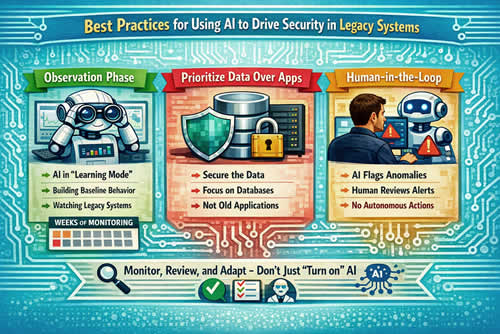
Best Practices for Using AI to Drive Legacy System Security
To make this work without breaking operations, you need a grounded approach. You don't just "turn on" AI and hope for the best.
- Observation Phase: Start by getting the AI to run in "learning mode." In other words, it will watch your existing systems for several weeks and build a baseline of normal behavior before it even starts to block anything.
- Prioritize Data Over Apps: Focus your AI security efforts on where the data sits. It is often easier to secure the database than the ancient application that accesses it.
- Human-in-the-Loop: Especially in the early stages, the AI should flag anomalies for a human to review rather than taking autonomous action that could shut down a production line.
Consider a retail chain with an old point-of-sale system. During a security upgrade, they used AI to monitor the traffic from their stores to the central office. The AI noticed that several terminals were sending encrypted pings to an unknown IP address in another country. Because the AI was in "alert" rather than "block" mode, the IT manager could verify it was a dormant piece of tracking software from a previous vendor before choosing to isolate those machines safely.
The Future of Cloud Security for Legacy Systems
We are moving toward a "self-healing" model of security. In the near future, AI won't just tell you there is a problem; it will temporarily wrap the vulnerable part of your legacy system in a
virtual patch while you plan a permanent fix. This "virtual patching" allows companies to keep their reliable old systems running safely for years longer than previously thought possible.
Legacy systems are not anchors holding you back; they are the foundations of your current success. With AI-driven cloud security, you can protect those foundations without the risk of a catastrophic "rip and replace" project. It allows for a gradual, safe transition to a modern infrastructure, ensuring that your security setup is as robust as your business logic.