You key a few numbers into the first “loan calculator” Google shows and relax when the monthly payment looks small. Unfortunately, the calm vanishes when the lender’s quote arrives at twice the figure.
The gap isn’t your math – it’s the calculator. Mortgage widgets bank on 30-year terms and small fees; commercial loans look at five-year clocks, balloon balances, and line-item charges. Using the wrong tool warps cash-flow plans and risks sticker shock before closing. In this ZandaX article, we’ll compare both types of calculators and show which one – or a combination of both – keeps more money in your pocket.

Commercial Loans vs Mortgages: Key Differences In Calculations
We need to speak the same language.
First, let's
highlight the differences. Residential mortgages are made for individual borrowers, while commercial loans serve legal entities. And that single shift, from W-2 earner to LLC, rewrites almost every calculator assumption. Amortization, fees, and risk pricing all follow a new rulebook.
AdvisoryHQ condenses those rules into six pressure points:
- Type of borrower
- Speed of amortization
- Loan-to-value limits
- DSCR versus DTI
- Interest costs
- Prepayment penalties.
Let’s walk through each point.
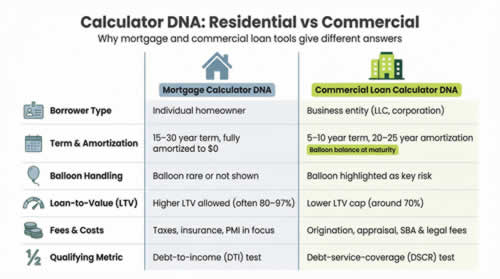
A home loan usually stretches 15 to 30 years and reaches a zero balance on schedule. Many commercial loans, by contrast, mature in five or seven years and leave a balloon that can dwarf annual profit. Miss that detail in the calculator and the cash-flow forecast is pure fantasy!
The interest story is similar. Lenders see commercial property as riskier, so they add basis points and add things like setup fees, guarantee charges, and legal costs that never appear in a mortgage quote. A business calculator requests those numbers up front; a consumer mortgage tool does not, so its “total cost” is actually only half the story.
Qualifying tests differ too. Homebuyers live or die by debt-to-income. Businesses are scored on debt-service-coverage, which is net operating income divided by debt payments. A good commercial calculator surfaces that ratio; standard mortgage widgets ignore it.
Even collateral rules are different. Residential lending often allows 80–97 percent loan-to-value, while commercial lenders usually stop near 70 percent. The calculator has to reflect that ceiling so you know the cash you must bring to closing.
Now put the contrasts side by side and the risk of using the wrong tool jumps into focus:
Feature |
Mortgage calculator |
Commercial loan calculator |
Default term |
15–30 yrs, fully amortized |
5–10 yrs, 20–25 yr amortization |
Balloon handling |
Rarely shown |
Prominently shown |
Fee inputs |
Taxes, insurance, PMI |
Setup, appraisal, SBA fees |
Qualifying metric |
DTI |
DSCR |
Now let’s see how these structural gaps ripple through the features you click and the dollars you pay. For now, remember: calculators inherit the DNA of the loans they model. Use the wrong DNA … and the numbers lie. And, in the final analysis, it’s your fault!
Feature Face-Off: What Each Calculator Does
1. Inputs – feed the right numbers
Every calculation starts with raw ingredients. When key items are missing, the result tastes wrong no matter how long you simmer the math.
Mortgage widgets keep the list short: loan amount, interest rate, term, and maybe taxes or insurance. Good enough for a suburban three-bedroom, but nowhere adequate for a business purchase.
Commercial calculators widen the pantry. They ask for property value (to gauge loan-to-value), balloon term (to flag the lump-sum exit), and line items for setup or SBA fees. Some also request projected rental income so you can gauge the debt-service-coverage ratio while you type.
One helpful example is Lendio’s free
Commercial Mortgage Calculator. It grabs property purpose, amount sought, loan term, and your cash-reserve percentage in one screen, then returns an estimated APR, monthly payment, a borrowing range, and a downloadable amortization table for the exact
loans scenario you just keyed in, so you see both cost and lender fit before you crunch anything in a spreadsheet.
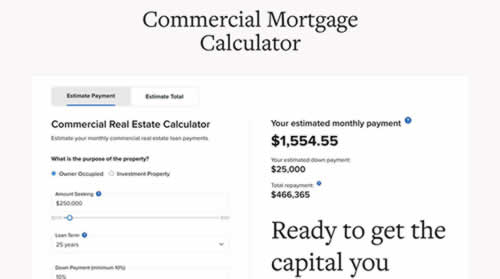
The lesson is simple. Input gaps create output gaps! Feed a mortgage tool plain numbers and it returns plain answers. Feed a business tool the full recipe – fees, income, balloon horizon – and it gives you a picture that matches the bill that lands on your desk.
2. Outputs – see the full picture
Numbers in, story out: the story changes with the narrator.
A mortgage tool focuses on peace-of-mind budgeting. It shows monthly principal and interest, then adds taxes, insurance, and maybe PMI. Helpful for household cash flow, but it hides how the amount owed falls … or fails to fall.
Business calculators flip the spotlight. They headline total repayment, break fees into dollars, and print an amortization table that shouts, “At month 60 you still owe half the loan.” Many also highlight any balloon balance in bright red, so you see the cliff before stepping off it. Which helps.
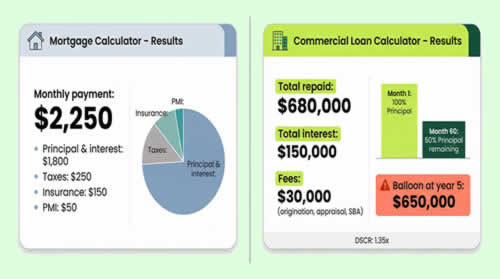
One view supports a household budget; the other evaluates a deal. Read the right output and you catch hidden costs early.
3. Interest type – fixed, adjustable, and interest-only
Rates move!
Residential calculators recognize this and often include a toggle for fixed versus adjustable. Some even let you schedule a future reset and watch the payment jump when the teaser period ends.
Business tools handle a different creature. Most commercial notes are fixed at first or switch to interest-only for a set window before payments to reduce the amount owed (called the principle) actually begin. Good calculators let you model that pivot with one checkbox. Great ones plot two lines on the amortization chart so you see the lull in principal and the spike when amortization starts.
An interest-only stretch feels gentle until you factor in the balloon it builds. When the calculator shows that risk, you can plan or negotiate before the clock starts ticking.
4. Scenario tools – play “what-if” before you sign
A calculator should work like a whiteboard, letting you sketch futures before committing dollars.
Mortgage sites excel here. Slide a bar to add one extra payment a year and the payoff date pulls forward. Switch from a 30-year to a 15-year term and total interest shrinks on cue. Fast, visual … and motivating.
Commercial tools are now catching up. A few will let you drag term, down payment, or rate and watch the debt-service-coverage ratio update in real time. Others offer side-by-side panes, perfect for comparing an SBA 7(a) quote with a conventional bank offer.
Tiny tweaks build. Shaving two years off a seven-year loan or raising the down payment by five percent can erase tens of thousands in interest. When the calculator shows that saving in bold, it’s correct to treat it as money found!
5. UX and export – from screen to spreadsheet
A calculator earns its keep only if you enjoy using it!
Consumer mortgage sites mastered that craft years ago. Sliders glide under your fingertip, pie charts adjust as numbers shift, and mobile layouts feel roomy. You finish a quick test on the train and swipe it away before your stop.
Some commercial tools still feel like dial-up relics: no sliders, tiny fonts, and tables that overflow a phone screen. People just switch off.
Look out for a calculator that looks clean and lets you export. One click should download the full amortization to Excel or Google Sheets. That file becomes your sandbox; add extra payments, tag cash-flow months … or maybe share with a partner who prefers columns over widgets.
When interface and export work together, the calculator stops being a toy and becomes a decision document you can print, email, or attach to a loan committee memo. That’s time saved AND clarity gained.

If you'd like to learn more about accounts and finance, why not take a look at how we can help?
Boost your understanding of accounts with our online courses.
RRP $65 – limited time offer just
$23.99
Which Saves You More? Cost Scenarios & Optimization Tips
Using the right tool prevents costly mistakes
Imagine you plug a five-year commercial term loan into a 30-year mortgage calculator. The payment looks gentle, cash flow feels safe, and you green-light the purchase. Six months later the banker hands you the real amortization. Surprise: the monthly outlay is nearly double, and a balloon lurks at year five.
The pain is real. Owners call lenders every week stunned by quotes that differ from the numbers they saw online. The culprit is almost always the same – a consumer-first calculator that’s been applied to a business loan.
Swap in a purpose-built commercial tool and the picture sharpens. Monthly payment reflects the shorter amortization. Fees land in the total-cost line. The balloon you’re building shows up in bold, so you know the obligation before you spend a dollar on appraisals or legal work.
This clarity guides smarter choices. If the payment strains cash flow, you can adjust term, raise a down payment, or switch to equipment financing long before closing day. By avoiding the wrong tool early, you skip late-stage renegotiations that add legal bills and erode your credibility.
Bottom line: the calculator you choose acts like a compass. Pick the wrong one and you wander. Pick the right one and each step moves toward a loan your business can live with.
Commercial loan vs. home equity: when a higher rate wins
Now let’s run some real numbers.
Let's say you need $100,000 to expand inventory. Your house has equity, so the bank offers a 20-year home-equity loan at 6.5 percent with no upfront fee. A lender friend quotes a 10-year commercial term loan at 9 percent plus a 3 percent setup fee.
At first glance, 6.5 percent feels like a bargain. A quick mortgage-calculator check shows a monthly payment near $745. The business-loan calculator shows $1,266. That gap tempts you to go for the house loan.
But scroll to the bottom lines.
- Home-equity option: total interest over 20 years ≈ $78,000
- Commercial loan: fee adds $3,000 day one, interest over 10 years ≈ $49,000
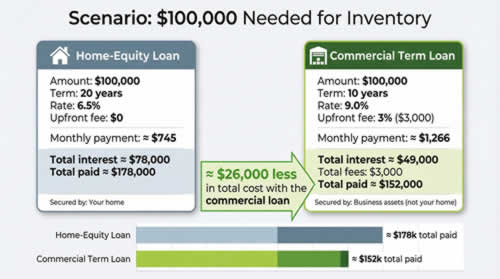
Even after the fee, the business loan saves roughly $26,000 in lifetime cost and keeps your home safe!
Those savings lurk in the long tail. Only calculators built for each product show them quickly. By stacking the two tools side by side, you turn instinct (“lower rate is cheaper”) into insight (“shorter term saves more interest than a lower rate ever will”).
Optimizing loan terms for savings
Small tweaks move big money.
Open your business-loan calculator and
shorten the term from ten years to eight. The payment inches up, but the total-interest bar plunges. On a $250,000 note at nine percent, trimming two years can erase nearly $30,000 in interest — enough to fund next quarter’s marketing campaign.
Now test the
down-payment lever. Raise equity from 20 to 30 percent and the loan shrinks, slicing both monthly burden and lender risk. Many banks reward that lower loan-to-value with a rate cut of 25 to 50 basis points. Enter the new rate and the savings grow.
Extra cash one month? Model a single $5,000 lump-sum prepayment at year two. The tool brightens as the payoff date slides forward, often by several months. Seeing the result in real numbers turns an abstract “maybe” into a concrete goal you can budget for.
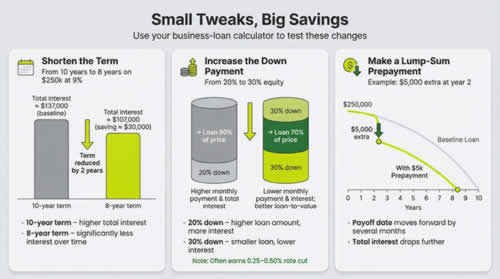
The pattern is clear: adjust, recalc, repeat. Each time you see another pocket of hidden interest you can keep for the business instead of the bank.
Avoiding hidden costs and fees
Rates grab headlines, but fees eat margins.
Setup points, broker commissions, closing costs — each sneaks into the documents as a small percentage yet grows into thousands of dollars when applied to bigger loans.
A thorough business calculator spotlights those extras. Enter the fee as a flat dollar or percentage and watch total repayment adjust instantly. Better still, flip to the APR view. When a “cheaper” 7.5 percent loan charges four points upfront, its true cost often climbs past 8 percent once amortized.
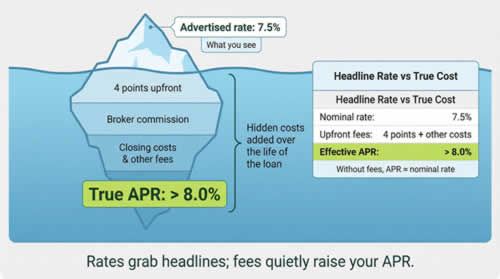
Mortgage tools can run the same test with points, but only if you enter the data manually. Make a habit of keying every fee line from the term sheet. If the calculator lacks a dedicated box, add the amount to the principal before running the numbers. Yes, it feels a bit clunky, but the math stays honest.
When we treat fees as equal citizens with interest, lenders can’t hide real cost behind a flashy headline rate. The savings show up not in lower payments today but in money that never leaves your account tomorrow – and, frankly, without a tool to show us this, most of us would be unaware of the true extent of the problem.
Using specialized calculators for niche loans
One size
rarely fits all in business finance, and calculators are no different.
Considering an SBA 7(a) loan? Open an SBA-specific tool. It bakes in the interest cap tied to prime, the annual guarantee fee, and the monthly servicing spread most banks add. You see the true APR, not just the nominal rate, and can test term lengths to find the sweet spot where the guarantee fee falls.
Eyeing a 504 real-estate deal? Use a calculator that splits the loan into its government-backed debenture and conventional second note (loan). You’ll see how the low, fixed debenture rate offsets a higher bank rate on the remainder — knowledge that can strengthen negotiations.
Equipment financing, factoring, merchant cash advances: each niche has quirks a generic calculator glosses over. Search for purpose-built tools or export an amortization and tweak the formula yourself. The deeper the calculator understands the product, the faster you uncover paths to save you sums of money that can shock you.
Match the tool to the loan type and you swap guesswork for precision. And it's precision that keeps more profit in your business.
If you'd like to learn more about accounts and finance, why not take a look at how we can help?
Boost your understanding of accounts with our online courses.
RRP $65 – limited time offer just
$23.99
Staying Current: Rates, Tools, And Trends To Watch
Interest rates move. The Federal Reserve paused hikes in late 2025, leaving 30-year mortgages near 6 percent and SBA 7(a) loans hovering between 10 and 15 percent. Bankrate’s tracker shows a midpoint of about 11 percent today. Every half-point shift reshapes your forecast, so overwrite a calculator’s default rate with the latest data before you press “calculate”.
Rules also change. When the SBA trimmed its guarantee fee on loans under $500,000, several lenders updated their calculators within weeks. If you rely on an older widget, you may overstate upfront cost and abandon a deal that now makes sense.
Fintech is closing that lag. Newer calculators pull live rates through APIs, pre-fill prime and Treasury benchmarks, and even nudge you when a cheaper refinance appears. Accounting apps now embed mini-tools so you can test scenarios inside your cash-flow dashboard. The result: you run more “what-ifs” and are able to spot savings sooner.
And maybe surprisingly, “free” still beats “paid” for most situations. Premium apps mainly remove ads or track a portfolio; they rarely improve the math itself. So start with no-cost tools, export results, and upgrade only if you need to look at highly specific situations.
Conclusion
Our conclusion is simple: stay alert to rate swings, tool updates, and new integrations, and your calculator remains a living compass that can save you thousands of dollars, not last year’s map.